Chapter 14- Package Management
I refer to The Linux Command Line by William Shotts every day on the job. The book is freely available online at the link below. This is a short post sharing what I learned from the book about package managers.
The Linux Command Line by William E. Shotts, Jr.
Package management
Software is constantly being updated. Back in the day, if someone wanted to install and update software on their operating system, they had to download the source code of the software and compile the source code into executable machine code that could run on their operating system. Now we have the luxury of installing precompiled packages, making the process of installing and updating software much faster and easier.
I am not familiar with how things work on a Windows operating system, but if you are using a macOS, you may be familiar with Homebrew, “the missing package manager for macOS.” Using Homebrew makes it very easy to install packages onto your computer. For example, my macOS comes with Python 2.7 out of the box. I don’t need to install anything in order to run Python 2.7 applications on my machine. However, it is 2017 and I would like to be using the latest version of Python, Python 3.6, on my laptop. With Homebrew, it is as easy as entering brew install python3 in my terminal.
Different Linux distributions use different packaging systems. Most distributions take advantage of one of two major packaging systems: the Debian style (.deb) or the Red Hat style (.rpm). For example, at work I use the Linux distribution Ubuntu for my operating system, which is a desktop distribution derived from Debian. While I am at work, I often am spinning up AWS EC2 instances, and when I am spinning up these virtual machines “in the cloud,” the Amazon Linux AMI uses the Red Hat packaging system.
How does a packaging system work?
Almost all open-source software can be readily accessed via the internet. And since the Linux operating system is open-source, almost all software for the Linux operating system can be found on the internet. It is often found on the internet as a package file, which is a compressed collection of the files that make up the software package. Compressing these files makes it easier and faster to transfer the package over the internet and download onto your computer.
I often use high-level package tools in order to install software packages on my different machines. While using my personal macOS, I will install a package by entering brew install package_name in my terminal. On my work computer, using the Ubuntu operating system, I will type apt-get install package_name and while using an Amazon EC2 instance, I will type yum install package_name. These different package managers are all doing the same thing. They are looking at their repository of packages, finding the package file you are looking for, and then installing the package on to the operating system.
Another nice plus about using a quality package manager is that they often take care of installing any necessary dependencies as well. For example, on my Amazon EC2 instance, I can build a simple server using an Apache HTTP server software. When I enter the command in the terminal yum install httpd, the Red Hat package manager knows that I also need to install a handful of other programs that the Apache HTTP server software requires in order for it to work.
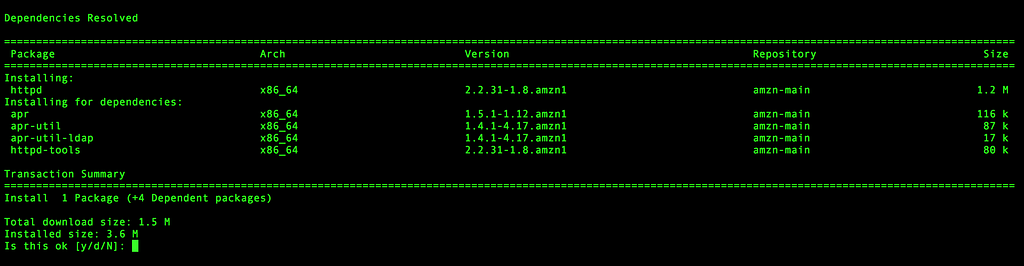
Output from running the command yum install httpd in an Amazon EC2 instance
Another helpful tool for using a package manager is how easy it is to keep your system up-to-date with the latest version of packages. On any of the computers I am using, it’s just homebrew update, apt-get update, or yum update. One thing to keep in mind is that your projects may be dependent on certain versions of a software in order to work, and an update may actually cause problems while working with this project. This is when it is helpful to use something like Docker to manage your project environments.