I will say upfront that my motivation for learning how to use Vim is strictly practical. I cannot stand the silly arguments developers get into over which text editor they use, so please know that this article is simply encouraging juniors developers to check out a more traditional text editor like Vim.
I recently wrote an article sharing what I have learned from the book The Linux Command Line by William E. Shott. I reference this book every day at work as I am getting more and more comfortable with navigating an entire operating system without the use of GUIs. This is a useful skill to have if you are interested in working with cloud computing services like AWS (Amazon Web Services).
When you take advantage of a service like AWS’s Elastic Compute Cloud (EC2), you cannot access your application code as you normally would on your own personal computer. When I launch an EC2 instance via the AWS console, I am ultimately taking control of a computer that is located in some Amazon data center. You cannot just show up at the data center and ask to start working on the computer that is serving your application. You need to be able to do this remotely, via your own computer’s terminal.
Hence the motivation for getting comfortable using the Linux command line. In my own computer’s terminal, I can navigate my deployed Amazon EC2 application just like I would in my own terminal. I do not have the luxury of using the GUI in my deployed EC2 application. I need to do everything from the command line.
In a similar spirit, I have decided to start using Vim. When I started writing code, Sublime was a very popular text editor, and then I started using Atom. They are plenty of modern GUI-based text editors to choose from. However, when I am working on my application “in the cloud,” I need to be able to do everything from the terminal. And that includes editing and saving my code. Here is where the magic of a tool like Vim comes in.
Traditionally, Vim runs inside of the terminal, with no graphical user interface (GUI). The power of Vim comes into play when it is used as a textual user interface (TUI). Every Linux operating system comes with Vim preinstalled, so everything is ready to go! Working with Vim takes a little getting used to so be patient as you get the hang of it. It is a great tool to have in your tool belt as a software engineer. In my month of working with Vim, I have really come to love its simplicity and its utility.
vimtutor
Curious to get started? If you are working on a Mac OS or Linux OS, simply open up your terminal and enter vimtutor…

… and voilà!
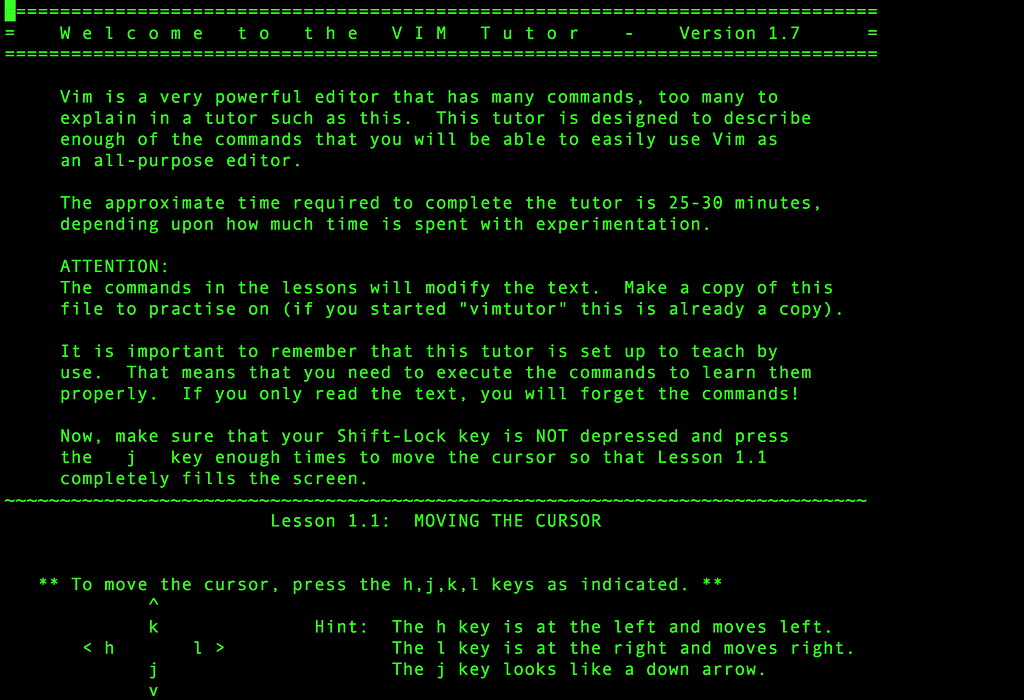
This tutorial was written to help you learn the fundamentals of using Vim. It says it only takes 25–30 minutes to get through. I personally found it helpful to repeat some sections over and over again to engrain the strokes into memory, so I took much longer to get through it, but I believe learning the fundamentals has served me well.
At the end of the tutorial, there are a few book suggestions for further reading and studying, including Vim — Vi Improved by Steve Oualline. I found it frustrating to work with this book because many suggested commands did not work. I’m assuming because it was published in 2001 that the book is outdated.
Practical Vim
After going through vimtutor, I would suggest you dive into the deep end with Practical Vim by Drew Neil.
It is not a book geared towards beginners, but it is an excellent resource. The book is set up as a series of tips so you can jump around to pick up skills that you immediately want to learn. Each chapter is set up so the early tips in the chapter are geared towards less-experienced users while the tips at the end are targeted for more advanced readers.
Conclusion
As a software engineer, I understand it is overwhelming to constantly get suggestions on what tools to use. Developers love making tools to make their work life easier, but I’ve come to realize that they often make things more complicated then they need to be.
Vim was first released in 1991. Stack Overflow does an annual survey about developers, and according to their 2016 survey, 26% of the 56,033 developers interviewed prefer to work with Vim. 26 years after the creation of Vim, and 26% of the development community still uses Vim as their text editor of choice.
Stack Overflow Developer Survey 2016 Results
Again, I am not trying to be part of the silly war about text editors. My point is don’t fix what ain’t broken. Use tried and true tools to make your day-to-day life as a developer easier for years to come.